

Having recently switched from Windows to full-time Linux, I must admit that I’ve been distrohopping a bit. First I was on EndeavourOS for a few days, then Nobara, and now CachyOS. After trying these three distributions, I think I might have hit the jackpot with CachyOS.
Cachy is the perfect mix of rolling-release Arch and stable gaming optimizations, which makes it the ideal pick for people like me. If you’re interested in things that stay updated, fix issues right away, and are built to be optimized for any specs, you would usually pick an arch-based linux distro. The thing that separates CachyOS from other distrobutions is the fact that it manages to add necessary optimizations for gaming and graphics while keeping your computer running smooth and not installing a ton of unnecessary packages.
Other distrobutions like Nobara will come pre-installed with some unnecessary modifications, but Cachy leaves it up to you to install extra modifications, but still applies what is needed to run games well while still being a lightweight installation.
Easy Installation
With CachyOS comes an installation process as easy as clicking a few buttons. In the interface, no commands have to be run as the whole process uses Calamares, a popular graphical installer.
Calamares is used in base KDE installations, so it is a familiar and favorable process.
Looks
The distro also has its beautiful looks because the base version uses KDE as its desktop environment. Obviously, there are other good looking environments like GNOME and Hyprland that you can install for CachyOS, but KDE has it looking beautiful too.
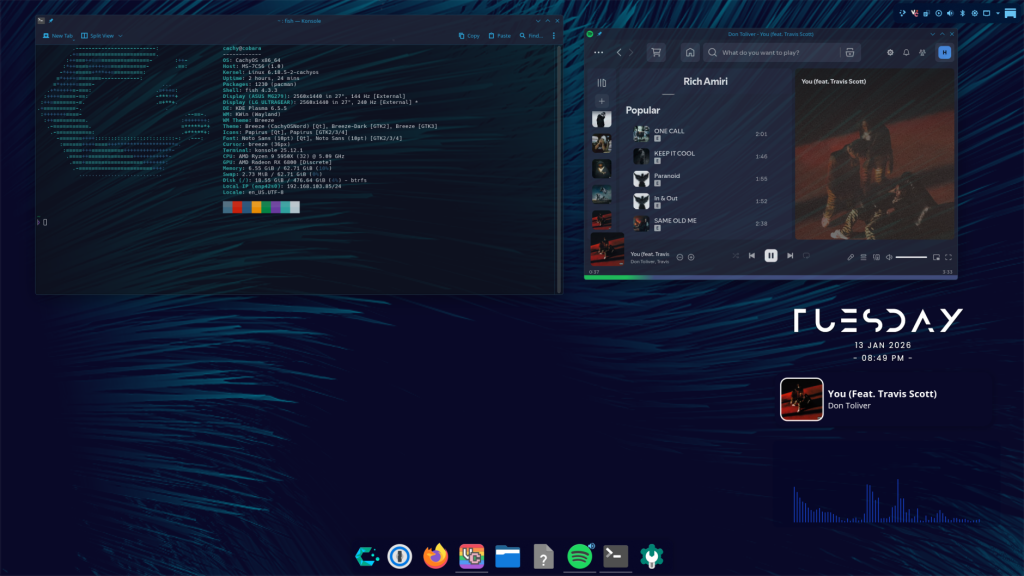
They also have some sick wallpapers on their github repository if you wanna super secretly snatch them.
Compatibility
Just like any other Linux distro, CachyOS has its downsides. It can support many games, but it can’t support games with kernel-level anticheats like Fortnite or most games with Epic’s Easy Anti Cheat.
Despite this obstacle, CachyOS has a wide variety of preinstalled drivers and tuned settings to make performance with gaming a breeze. I was able to easily install my favorite steam games and get them running pretty fast. I also installed Minecraft, Roblox, and some others. Overall, Cachy does a really good job with gaming. Some games with steam require you to manually enable the use of Proton in compatibility settings which fixes some issues that might arise with some games. Although it is very good, it still comes across issues when playing certain games, which ultimately led me to switch back to Windows.
Should You Install It?
Your choice on installing CachyOS depends on your use case. For an easy installation, you might want to start with something like Mint or Nobara for a more plug and play experience, because Cachy being based on Arch means there is a bit of a command difference and a slight harder learning curve. Personally, I had only used about two other linux distros before using an arch-based one (Endeavour) and if you’re up for the challenge you can go ahead and install it as a beginner, but an easier approach might just be an Ubuntu or Fedora-based distro. If you have no experience with a terminal, you should probably avoid CachyOS.
- If you’re looking for raw performance, CachyOS is among the most popular and most performative distros. Nobara vs CachyOS vs Bazzite has been a very large debate between these, and CachyOS is definitely up there.
- If you’re looking for a distrobution for less gaming and more work-based tasks as a software developer, designer or engineer, go for Fedora Workstation.
- If you play games like Fortnite and Apex Legends and want that compatibility, stick with Windows, don’t get a cloud gaming subscription.
Summary
These are a few good points, but at the end of the day the choice is yours. I would just like to mention that my experience with the distro was nice and smooth, just don’t break your computer because it is.. well.. Linux.
A lot of the issues I encountered during my experience with CachyOS were solved by the lovely community at the CachyOS Forum. If you choose to use this distro, I highly suggest trying to solve problems based on what people have previously encountered on the forum or by creating your own post.
Anyways, if you like what you saw in this post and you want to learn more or install the distro, head to this link.
Leave a Reply